LinkedIn Post Size Guide: The Exact Dimensions
If you’ve ever uploaded an image to LinkedIn only to watch it get awkwardly cropped, or hit “see more” on your own post because the text got truncated, you already know why this matters. LinkedIn doesn’t make its size specs easy to find, and they’ve quietly changed more than once over the past couple of years.
This guide covers every size you’ll actually need, images, video, carousels, text limits, and profile assets, so you can stop guessing and start posting content that looks the way you intended it to.
What Is the Ideal LinkedIn Post Image Size?
The safest image size for a standard LinkedIn feed post is 1200 x 627 pixels. This gives you a clean 1.91:1 ratio that displays properly on both desktop and mobile without LinkedIn cropping your edges or adding awkward letterboxing.
A few things worth knowing:
- Square images (1200 x 1200 px) also perform well and often take up more vertical space in the feed, which can mean more scroll-stopping power.
- Minimum size LinkedIn accepts is 552 x 276 px, but anything below 1200 px wide will look soft or pixelated on higher-resolution screens.
- File size cap is 5MB for standard image uploads.
- Stick to JPG or PNG. PNG is better if your image has text or sharp lines, since it won’t introduce compression artifacts.
If you’re designing graphics with text overlays, quote cards, stat callouts, that kind of thing — keep important text and faces away from the outer 10% of the frame. LinkedIn’s preview crop can clip the edges depending on the device.
What Size Should a LinkedIn Video Be?
For native video uploads, LinkedIn recommends:
- Resolution: 1280 x 720 px minimum (1920 x 1080 px for full HD)
- Aspect ratio: Square (1:1) or vertical (9:16) tend to outperform landscape in the mobile feed, simply because they take up more screen real estate while someone scrolls
- File size: Up to 5GB
- Length: 3 seconds to 15 minutes for standard posts (LinkedIn has tested longer uploads for select accounts, so don’t be surprised if you see variation here)
- File format: MP4 is the safest bet for compatibility
If you’re repurposing a video that was originally cut for Instagram or TikTok, the 9:16 vertical format usually transfers over cleanly to LinkedIn without needing a re-edit.
What’s the Best Size for a LinkedIn Carousel/Document Post?
Carousel posts (technically “document” posts) are one of the best-performing formats on LinkedIn right now, and getting the size right matters more here than almost anywhere else.
- Recommended dimensions: 1080 x 1080 px (square) or 1080 x 1350 px (vertical, if you want it to take up more mobile screen)
- File format: PDF works best for multi-slide carousels, PowerPoint and Word docs also upload fine but PDF preserves formatting more reliably
- File size limit: 100MB
- Slide count: Up to 300 pages, though realistically 8–12 slides is the sweet spot for keeping people swiping to the end
What Is the LinkedIn Character Limit for Posts?
This is the one that trips people up the most because LinkedIn shows two different numbers depending on where you’re looking.
- Total character limit: 3,000 characters
- Visible before “see more” cutoff: Roughly the first 210 characters on mobile, and slightly more on desktop
That means your first two to three lines are doing all the work. If someone doesn’t have a reason to tap “see more” within that first visible chunk, the rest of your post, however good, doesn’t get read.
A practical fix: write your hook as if it’s the entire post. Don’t tease “here’s why” and make people click to find out. Say the actual thing up front, then use the rest of the post to back it up.
LinkedIn Profile and Company Page Image Sizes
Since we’re covering sizing anyway, here are the specs people search for just as often:
| Asset | Recommended Size |
|---|---|
| Profile photo | 400 x 400 px |
| Personal cover/banner | 1584 x 396 px |
| Company logo | 300 x 300 px |
| Company cover image | 1128 x 191 px |
| Company page banner (new layout) | 1128 x 376 px |
Quick Reference: LinkedIn Sizes at a Glance
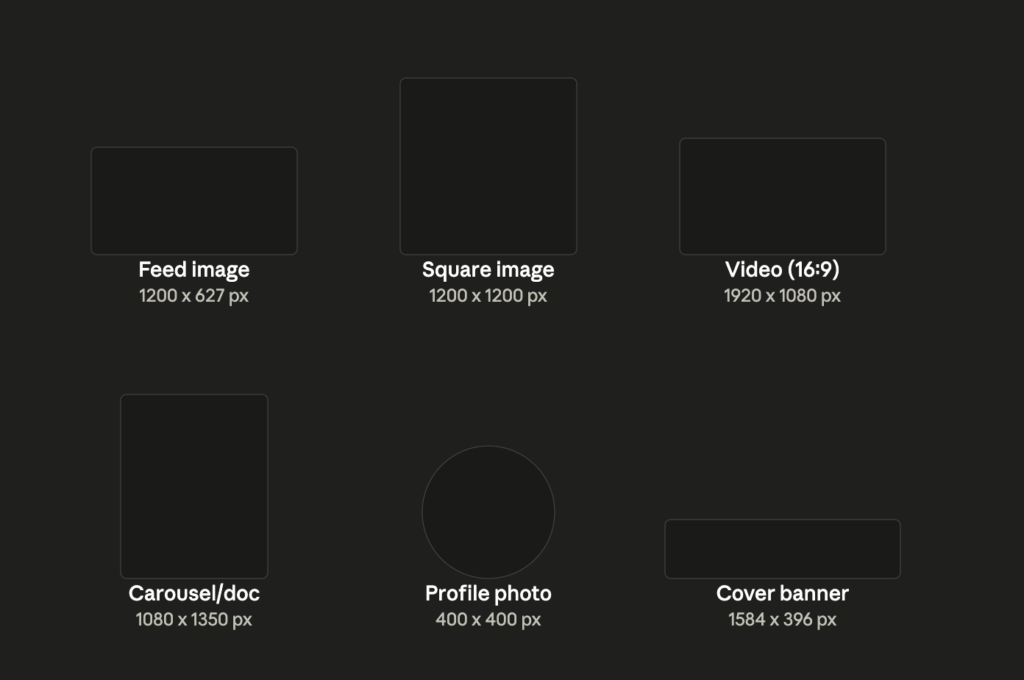
- Feed image: 1200 x 627 px
- Square image: 1200 x 1200 px
- Video: 1920 x 1080 px (or 1080 x 1920 px vertical)
- Carousel/document: 1080 x 1080 px or 1080 x 1350 px
- Post text limit: 3,000 characters (210 visible before cutoff)
- Profile photo: 400 x 400 px
- Cover banner: 1584 x 396 px
Getting the Size Right Is Only Half the Battle
Nailing your image dimensions stops your post from looking broken. It doesn’t automatically make people stop scrolling, engage, or remember your brand. That part comes down to strategy, knowing what your audience actually wants to see, when to post it, and how to structure content that earns the click instead of just avoiding a crop error.
If you’d rather have that side handled by people who live in LinkedIn algorithms and content strategy every day, Viral Fry builds and manages LinkedIn content strategies, from founder-brand positioning to full content calendars, so your posts aren’t just correctly sized, they’re actually built to convert.
Frequently Asked Questions
What is the best LinkedIn image size for 2026?
1200 x 627 px for standard feed posts, or 1200 x 1200 px if you want a larger square format that takes up more space in the feed.
How many characters can a LinkedIn post have?
Up to 3,000 characters total, but only around the first 210 characters show before people have to click “see more.”
What size should a LinkedIn carousel PDF be?
1080 x 1080 px for square carousels or 1080 x 1350 px for vertical ones, keeping the file under 100MB.
Does LinkedIn crop profile pictures?
Yes, LinkedIn displays profile photos in a circular crop, so keep your subject centered and avoid placing important details near the edges.