Instagram search query optimization means making your profile and posts easy to find when people type a topic into Instagram’s search bar. Instagram matches the words in a search to account names, usernames, bios, captions, hashtags, and on-screen text, then ranks results using relevance, engagement, and your relationship with the searcher. To optimize, find the phrases your audience searches, then place them naturally in your name field, bio, captions, Reel text, and alt text.
More people use Instagram like a search engine than most marketers realize, especially younger users looking for restaurants, recipes, products, and how-tos. And since July 2025, public posts from professional accounts can also be indexed by Google and Bing, so the same work can bring you search traffic outside the app.
How Does Instagram Search Work?
Instagram has said its search results are shaped by three main groups of signals:
- The text you type: Instagram looks for matches in usernames, names, bios, captions, hashtags, and places.
- Your activity: accounts you follow, posts you’ve viewed, and how you’ve interacted with accounts in the past.
- Popularity signals: clicks, likes, shares, and follows on accounts and posts that match the query.
You can’t control the searcher’s history, but you can control the first group completely and influence the third with good content.
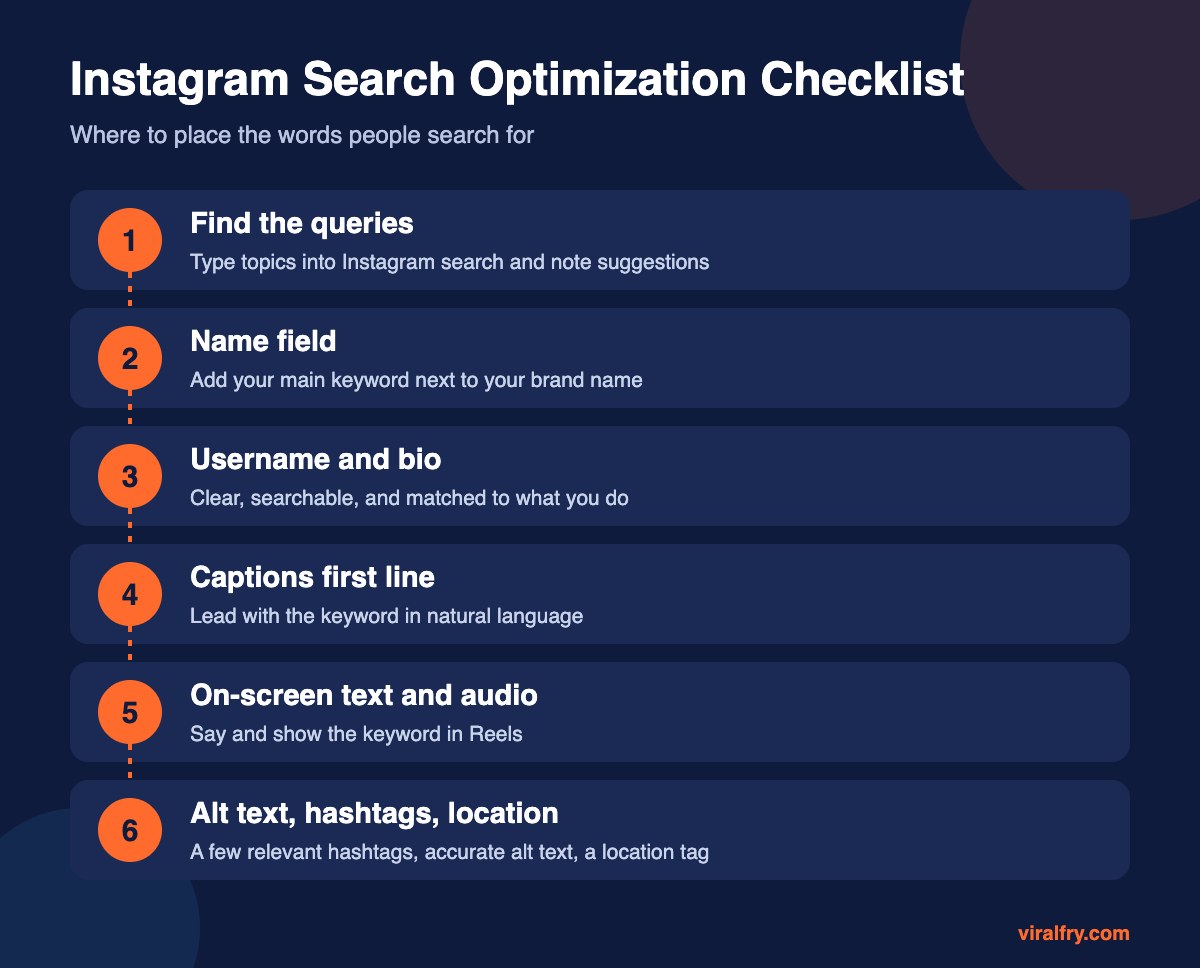
How Do You Find What People Search on Instagram?
- Type your core topic into Instagram search and write down the autocomplete suggestions.
- Look at the Accounts, Reels, and Tags tabs to see what already ranks.
- Check Google with “site:instagram.com” plus your topic to see which posts get indexed.
- Ask your sales or support team what customers call your product. Those words matter more than industry jargon.
- Use your existing SEO keyword research. Many queries overlap; our guide to choosing keywords for SEO works here too.
Where Should You Put Keywords on Instagram?
Name Field
This is the bold name above your bio, separate from your @username. It’s one of the strongest search signals. Something like “Riya | Vegan Meal Prep” will show up for “vegan meal prep” in a way that “Riya” alone never will. Keep it readable; a stuffed name looks spammy and puts people off.
Username
Ideally your brand name. If you’re a new creator or a local business, including a topic or city can help, but don’t change an established handle just for search.
Bio
Say plainly what you do and who it’s for. Bios aren’t weighted as heavily as the name field, but they help both Instagram and visitors understand you.
Captions
Put the main phrase in the first sentence, written the way a person would say it. “Three vegan meal prep ideas that last five days” beats a wall of emojis and hashtags.
Reels Text and Audio
Instagram can read on-screen text and auto-generated captions, so say your keyword out loud and show it as a text overlay in the first few seconds.
Alt Text, Hashtags, and Location
Write accurate alt text in advanced settings, use three to five specific hashtags, and add a location for anything local.
What Hurts Your Visibility in Instagram Search?
- Breaking Instagram’s Community Guidelines or Recommendation Guidelines, which can make your account ineligible to be recommended. Check Account Status in your settings.
- Using banned or broken hashtags
- Keyword stuffing in names and captions
- Buying followers or engagement, which damages trust signals
- A private account. Private profiles can appear in account search, but their posts can’t be found by non-followers.
If you think your reach has dropped suddenly, read our explainer on what shadow banning is and how to check for it.
How Do Instagram Posts Show Up in Google?
Public posts from professional accounts (business and creator) over 18 can be indexed by search engines. You can turn this off in settings. To give posts a better chance of ranking in Google, treat captions like mini web pages: a clear first line with the keyword, useful detail, and accurate alt text.
How Do You Measure Instagram Search Performance?
- In Insights, check where views come from; look for growth in non-follower reach and profile visits
- Search your target terms every couple of weeks from a logged-out or secondary account and note your position
- Track follows and link clicks after optimization changes
Search optimization works best as part of a wider plan. Our Instagram marketing strategy playbook shows how it fits.
Key Takeaways
- Instagram search matches your text, then ranks by relevance, activity, and popularity.
- The name field is the single most useful place for a keyword.
- Write captions and Reel text the way people actually search.
- Stay within Recommendation Guidelines and check Account Status.
- Public professional posts can also rank in Google, so optimize captions and alt text.
Frequently Asked Questions
What is Instagram search query optimization?
It is the practice of using the words people type into Instagram search in your name field, bio, captions, Reel text, and alt text so your account and posts appear for those searches.
Does the Instagram name field help with search?
Yes. The name field is one of the strongest text signals for account search, so adding a relevant keyword next to your brand name can improve discoverability.
Do hashtags still matter for Instagram search?
They still help categorize posts, but a few specific hashtags are enough. Keywords in captions, names, and on-screen text now carry more weight.
Can Instagram posts rank on Google?
Yes. Public posts from professional accounts can be indexed by Google and Bing unless the account owner turns that setting off.
Add as Preferred Source