Google says moving your site to a CDN can backfire on SEO in two ways. First, the faster site encourages Googlebot to crawl harder, which can swamp your origin server while the CDN cache is still empty. Second, the panic fix many admins reach for, switching on blanket bot protection, can lock Googlebot out until pages start dropping from Search. Google’s Gary Illyes and Cherry Prommawin explained both problems, along with three fixes, in a Search Central blog post and a companion video.
If a CDN move is on your roadmap, or you just made one and your server graphs look strange, this is worth a careful read.
What Did Google Publish?
The Search Central blog post, titled “Moving to a CDN without overwhelming your origin (or blocking Googlebot),” went up on November 11, 2026. It is credited to Cherry and Gary (plus, in typical Google Search Relations fashion, “some rubber chickens”). The two also covered the topic on video in the final episode of Google’s Non-Canonical Cabinet series.
Illyes summed up the problem neatly: “CDNs take the valve off the hose, so now crawlers are drinking from a fire hose.”
Why Does Moving to a CDN Increase Crawling?
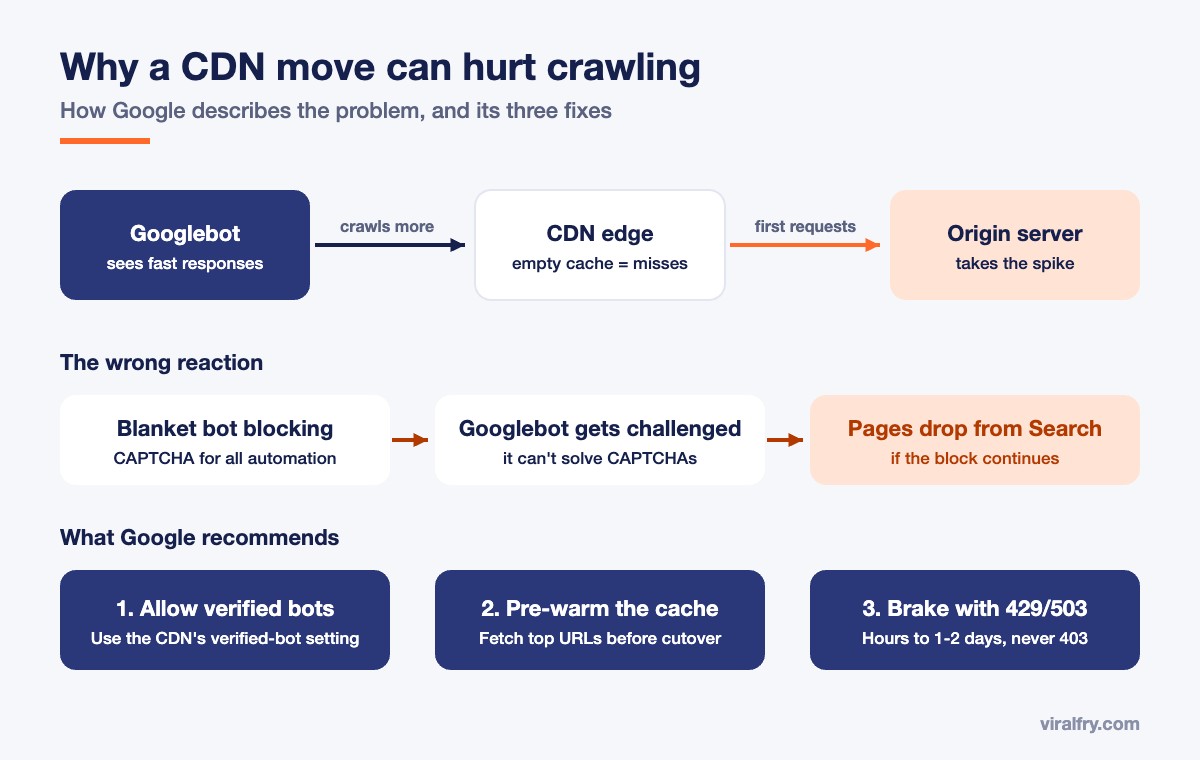
Googlebot keeps an eye on how quickly your server responds. Fast responses read as a sign of healthy infrastructure, so Google’s crawling systems gradually raise the crawl rate. Put a CDN in front of your site, responses get faster, and Googlebot starts asking for more pages. Most of the time, that is a good thing.
The catch is that a brand new CDN starts with an empty cache. The first request for any URL is a cache miss that still goes all the way to your origin server. Crawlers request a huge number of URLs, including plenty that real visitors rarely open, so the origin can take a beating before the cache has a chance to fill up. In short, a CDN does not protect your origin from every request on day one.
How Can Bot Protection Get Your Pages Dropped From Google?
This is where a manageable problem turns into a serious one. Right after the migration, admins see automated requests climbing in their origin logs, assume they are being scraped, and turn on aggressive bot blocking or CAPTCHA challenges for all automated traffic.
Googlebot cannot solve a CAPTCHA. When it keeps hitting challenges, it backs off, and if the block stays in place, the affected pages can drop out of Google Search. Google’s point is simple: accidentally blocking real search engine crawlers can do far more damage than the crawl spike you were trying to stop.
What Are Google’s Three Fixes?
1. Allow verified bots
Use your CDN or firewall’s verified-bot setting, and check Google’s requests against its published IP ranges. If you need to keep unwanted bots out, use robots.txt or targeted rules aimed at those specific bots instead of challenging every automated client.
2. Pre-warm the cache
Before you send all your traffic through the CDN, request your highest-traffic, peak-season and most-crawled URLs at a controlled pace. That way, the edge cache is already full when Googlebot and real visitors arrive.
3. Use a temporary brake if you need one
If your origin is under critical load while the cache warms up, use rate limiting to return HTTP 429 (Too Many Requests) or 503 (Service Unavailable) for a short window, a few hours and no more than one to two days. Avoid 403 responses, which block crawlers outright instead of asking them to slow down.
What Should You Check Before Your Next CDN Migration?
Google’s advice is short, so here is how we would turn it into a working checklist:
- Build your pre-warm list early. Pull your top pages from analytics and Search Console, and your most-crawled URLs from server logs or the Crawl Stats report.
- Confirm Googlebot is allowed before cutover. Turn on verified-bot handling in your WAF, then run a live test in the URL Inspection tool to be sure Google can still fetch your pages.
- Avoid peak season. Do not migrate right before your busiest sales period if you can help it.
- Prepare a 429 or 503 rule in advance, with a clear end time, so nobody reaches for a 403 in a hurry.
- Watch closely for the first week. Keep an eye on origin load, error rates and Crawl Stats in Search Console.
CDN problems tend to hide behind other symptoms, like a sudden drop in indexed pages, and that is especially confusing while the November 2026 core update is still rolling out. For a wider look at crawl and indexing problems, see our guide to common technical SEO issues and how to fix them.
Frequently Asked Questions
Does moving to a CDN hurt SEO?
Usually not. Faster responses generally help, and Google may crawl more. Problems happen when the origin server gets overloaded while the CDN cache is empty, or when bot protection blocks Googlebot.
Why did my origin server load go up after moving to a CDN?
A faster site encourages Googlebot to crawl more, and a new CDN cache starts empty. The first request for each URL still reaches your origin, so crawler traffic can spike before the cache fills.
Can CDN bot protection block Googlebot?
Yes. Blanket bot blocking or CAPTCHA challenges can stop Googlebot, which cannot solve CAPTCHAs. If the block continues, affected pages can drop out of Google Search. Use your CDN’s verified-bot setting instead.
Should I use a 403 or a 503 to slow Googlebot down?
Google recommends a 429 or 503 for a short period. Avoid 403, which blocks crawlers outright.
How long can I return 429 or 503 responses to Googlebot?
Google says to keep it to a short window, from a few hours up to one to two days at most.
Sources: Google Search Central Blog, Search Engine Journal, Search Engine Roundtable.
Add as Preferred Source